Overview
Rubrics are a grid-based evaluation system that allows for more accurate assessment of pre-defined categories, associated with one or multiple point values. Many faculty use Rubrics in some form or another when assessing. This article shows how this valuable tool can be digitized and applied in the Learning management system to assessments.
Audience
University Employees
Information
Rubrics are a grid-based evaluation system that allows for more accurate assessment of pre-defined categories, associated with one or multiple point values. They can be added to any Discussion, Journal or Assignment type assessment. On Blackboard Ultra, you can design a rubric from scratch, or use generative AI to produce a rubric based on input prompts and several parameters that can be customized. Any generated or created rubrics can be copied from one course to another.
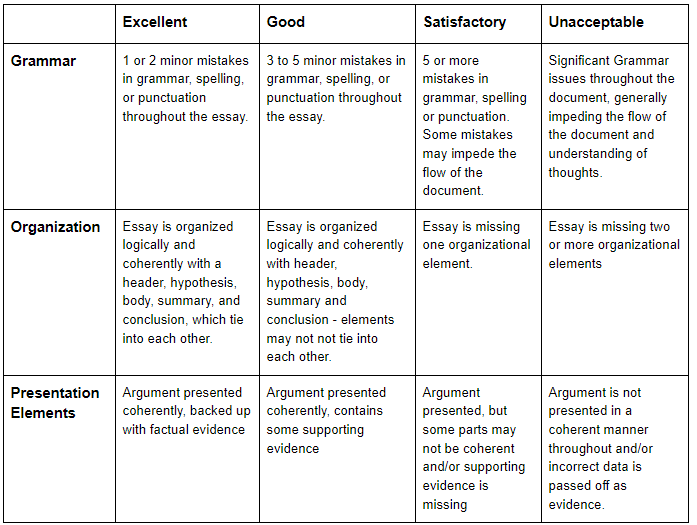
Generally, rubrics consist of a grid. On the left axis, rubrics will contain one or more criteria that will be measured against the assignment submission. On the upper axis, rubrics will contain one or more Levels of Achievement. These can be expressed numerically (as point values), as a range of point values, or as a percentage.
Here is what a sample rubric may look like:
Click here for documentation on how to create or generate rubrics on Blackboard Ultra.
NOTE: If you plan on associating a rubric with an assessment and using this for grading purposes, the assessment will require you to manually post grades after grading (auto-posting will be disabled). the reason for this is while you grade an assessment using the rubric in Blackboard, as you go through the rubric and apply the scores for each criteria, these scores aggregate in the student's grade box. Once you have completed grading using your rubric, you can then Post the grade to make it available to the student. More information can be found in the related article "How To Grade Using A Rubric On Blackboard Ultra".